
The link in your Instagram bio is sending traffic you can't see
Most contractors point their Instagram bio link at a free Linktree. It does the basic job, but it carries someone else's branding and hides the one thing worth knowing: what people do after they tap. Here's what we built for a client instead.
Instagram gives you a link in your bio. It’s the one place on the whole platform where a follower can leave Instagram and land on something you own. The only door from your following to your actual business.
Most contractors send that link to a free Linktree. It takes five minutes and does the basic job: a tidy list of buttons for your website, phone, and reviews. But for the most valuable spot you have on Instagram, a free Linktree does less than you think.
What the free Linktree actually is
It’s their brand, not yours. The address is linktr.ee/yourname and the Linktree logo sits at the bottom of the page. A homeowner who taps through from your account lands on a page that, for a moment, is advertising Linktree.
The look is generic and mostly out of your hands. A list on a colored background. It doesn’t match your website, your logo, or the rest of how your business looks.
And the bigger problem is the one you can’t see. Someone comes from your Instagram, taps your Linktree, and then nothing. You have no idea whether they went to your website, called you, glanced at your reviews and left, or closed the tab. The trail goes cold right when it gets interesting.
What we built for a client instead
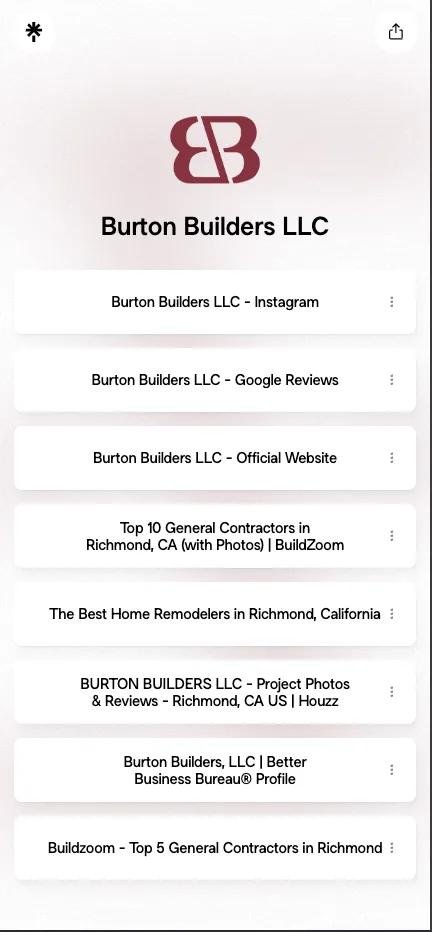
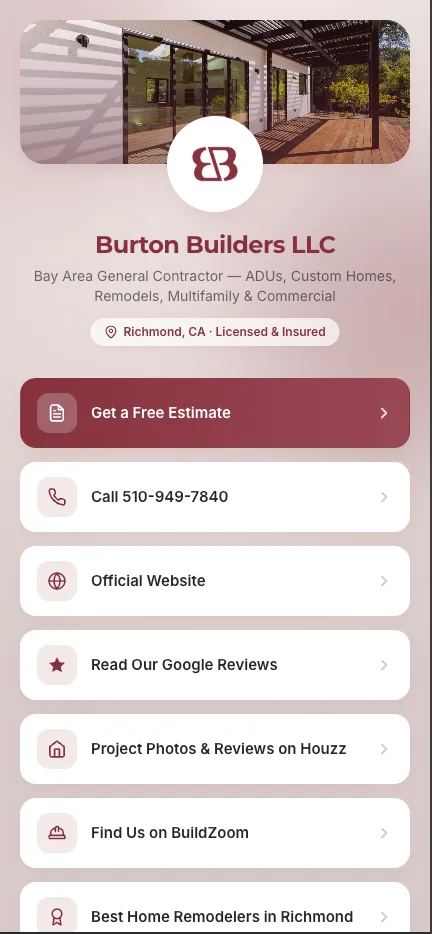
For Burton Builders, a general contractor in the East Bay, we built their own link page on their own website, at burtonbuildersllc.com/ig.
It looks like the rest of their site. Their colors, their logo, their name. It loads fast. No outside branding, no ad for a service they don’t use. At the top is a featured Get a Free Estimate button, then the essentials: call, website, Google reviews, Houzz, and their BBB profile.
From a follower’s side it does the same job a Linktree does. The difference is everything around it.
You can finally see what’s working
Because the page lives on their own website, it can be measured like the rest of it.
When someone taps the bio link, we attach a small invisible tag to the visit that tells the analytics “this person came from Instagram.” Every button on the page is counted the same way. So instead of a cold trail, Burton can see:
- how many people came from Instagram
- which buttons they tapped: estimate, call, reviews
- whether the visit turned into a phone call or an estimate request
That turns the bio link from a guess into something you can judge. If a post drives fifty people to the page and nobody asks for an estimate, that tells you something. If Get a Free Estimate is the most-tapped button by far, that tells you something too. The free Linktree shows you nothing.
Rent the features or own the page
To be fair, Linktree offers most of this on a paid plan. Take the branding off, customize the look, unlock analytics. It works. But you’re paying every month, forever, to rent those features on a page you still don’t own. Stop paying and it snaps back to the free version, logo and all.
A page on your own site does the same things, built once, and then it’s just part of your website. You can change a button, add a link, or reorder the whole thing whenever you want, with no subscription in the way.
The link in your bio is one door from a platform you’re renting to a business you own. Sending it to a free Linktree parks that traffic on someone else’s lot. A simple page on your own site costs a little more to set up once. In return you get something that looks like your business, belongs to your business, and finally lets you see whether your Instagram is doing anything at all. If you want one built, contact us.