
Nobody wants to click on traffic lights: how modern sites stop contact-form spam

The blurry-crosswalk puzzles turn away real customers, and the 'what is 1 + 3?' question stops nobody. How checks like Cloudflare Turnstile keep spam out of your contact form without bothering the homeowner.
You’ve solved these puzzles. Click every square with a traffic light. Now the crosswalks. Now the motorcycles. Wait, does the mirror count as part of the motorcycle? Try again.
That’s a CAPTCHA, and we’ve all accepted it as the toll for using the internet. But on your own website, the math is different. That puzzle is standing between a homeowner and your inbox. Someone who was about to hand you their name and number is being asked to prove they deserve to. Some of them won’t bother, and you’ll never know, because the ones who give up don’t leave a trace.
The puzzle exists for a real reason, though. So before you throw it out, it’s worth knowing what it was protecting you from and what does that job today without the toll.
Why your form gets spammed
There are bots that do nothing but crawl the web looking for forms to fill out. Any form. Yours included. They paste in links to sketchy sites, pitches for “guaranteed #1 on Google,” and gibberish that exists mostly to test whether your form is unguarded. If it is, you go on a list and the volume goes up.
An unprotected form on a small local-business site can pull in a handful of junk submissions a day. Not a disaster, but every fake lead is a small tax on your attention. The day you skim past a real homeowner because their message was sandwiched between two spam pitches, it’s cost you money.
So protection isn’t optional. The question is what kind.
The old fixes and what they cost
The image puzzle. It works by making the visitor do something computers used to be bad at. Two problems. The friction lands on your customer, often a homeowner on a phone, squinting at blurry fire hydrants. For someone with low vision it can be a wall. And the premise has expired. Modern bots solve image puzzles about as well as people do, and spammers rent services that solve them in bulk for pennies. You’re paying real friction for expired protection.
The quiz question. “What is 1 + 3?” or “Which of these animals can fly?” It feels clever. In practice it stops almost nothing. The question never changes, so a spammer’s software learns the answer once and types it forever. And most of these get checked in the browser, not on your server, so a bot that skips the browser and posts straight to your form never even sees the question.
The new way: check the browser, not the person
The current tools flip the idea. Instead of quizzing the person, they quietly examine the visit. The one we use is Turnstile, made by Cloudflare, a company that sits in front of a huge share of the internet’s traffic.
When someone opens a page with a Turnstile-protected form, it runs a series of small invisible tests in the background. Does this look and behave like a real browser, or like a script pretending to be one? If the visit passes, most visitors never see or click anything. Only when it’s unsure does it show its worst case: a single checkbox.
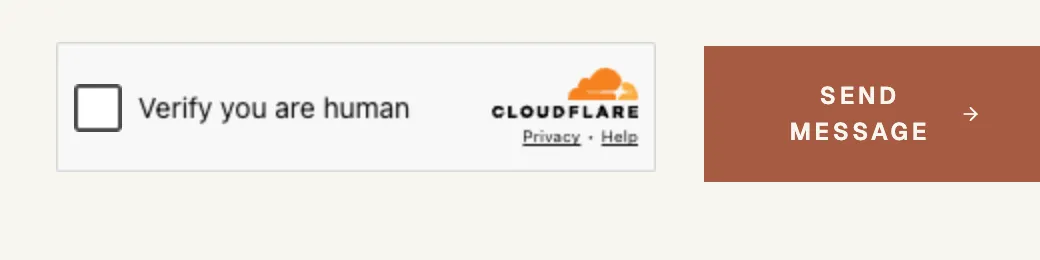
The whole “puzzle,” on our own contact form. Most visitors never see this. When Turnstile is unsure, one checkbox is as hard as it gets.
The other half happens where visitors can’t see it. Turnstile issues a one-time token that travels with the form submission, and our server hands it back to Cloudflare to confirm it’s real before the message is accepted. That server-side check is the part the “what is 1 + 3?” form never had. It protects the form itself, not just the page around it.
One more thing: Turnstile doesn’t harvest visitor data for ad targeting. The check is about this visit, not about building a profile of the person making it.
We can vouch for the “catches robots” part. To take these screenshots, we pointed an automated browser at our own contact form. Turnstile showed it the checkbox, and when our robot clicked, it was refused.
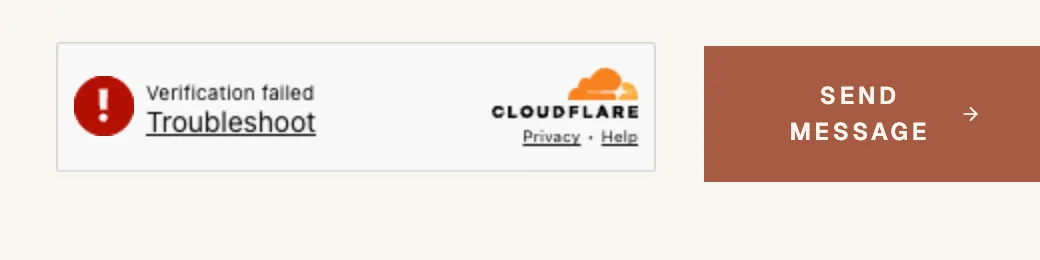
Our own screenshot robot, caught in the act. A human clicking the same checkbox passes.
Turnstile isn’t the only one
The same idea ships under several names. Google’s reCAPTCHA v3 is the most common, the invisible successor to its own traffic-light puzzles. hCaptcha does the same job. Privacy-focused options like Friendly Captcha and ALTCHA have the visitor’s device do a blink-of-an-eye bit of busywork instead. If your form already uses one of these, you’re in decent shape.
The brand matters less than the generation. If your spam protection quizzes the human, it’s the old kind. If it checks the visit, it’s the new kind.
Layers are better than one lock
On the sites we build, Turnstile isn’t the whole defense. Before a submission reaches it, it has to get past a honeypot: a form field human visitors never see because it’s hidden from the page. Bots don’t look at pages the way people do. They read the form’s code and fill in every field they find. Any submission with the invisible field filled out came from a bot, no puzzle required. Better still, the bot gets told “message sent!” and wanders off satisfied.
Both checks happen on the server, the one place a bot can’t skip. Neither asks your customer to do anything. That’s the standard to hold any modern form to: spend the suspicion on the software, never the person. It’s the same logic as cutting the clutter that costs you trust. Every hoop you remove is a lead you didn’t lose.
What none of this stops
A person who wants to waste your time. A human can pass every check ever built and then type a fake name, an invented phone number, and a nonsense project into your form. Every one of those checks asks “is this a human?” and the answer is yes. The occasional smart bot slips through too. It’s an arms race.
That’s fine, because it’s not the job. The job is to stop the automated flood, the 95-plus percent of junk that arrives by script, without turning away a single real customer. Getting a homeowner to reach out at all is hard enough. A form that makes them solve puzzles to give you money has it backwards.
Common questions
Will real customers ever see a puzzle?
Not with the modern tools. Most visitors see nothing. When Turnstile is unsure it shows one checkbox. No traffic lights.
Does this cost money?
It shouldn’t. Turnstile is free, and most form plugins and website builders can use one with a little setup. If your web person says spam protection needs a monthly fee, ask what you’re paying for.
My form asks a math question. Am I at least partly protected?
Barely. It filters the laziest bots and none of the rest. If spam is still getting through your quiz question, this is why.
If your form is running puzzles from 2015, or running nothing at all, contact us and we’ll take a look.